Avatars

Abbeycat

Werewolf
Joined
Dec 5, 2010
Messages
2,558
Location
Mystic Falls
Sineya
I know you guys just did whole big batch of new avatars but I noticed...

No Clem. Not even in other Buffy characters. Is it possible to make a few Clem avatars the next time you guys upload/update the avatars?
 
Per the FAQ:

The best thing to do is to add pictures you would like to the gallery, which is where we get the pics for avatars. You may also email us ([Email Darla]) any pictures you would like to see as avatars, and if they are workable we will add them. Please do not send pre-made avatars, as we will not add them. Only show-related pictures are acceptable.


If you have pics of Clem you'd like to see made into avatars, I'd suggest uploading them to the gallery. 🙂
 
Abbeycat
Abbeycat
Okay, thanks. I should have looked there.
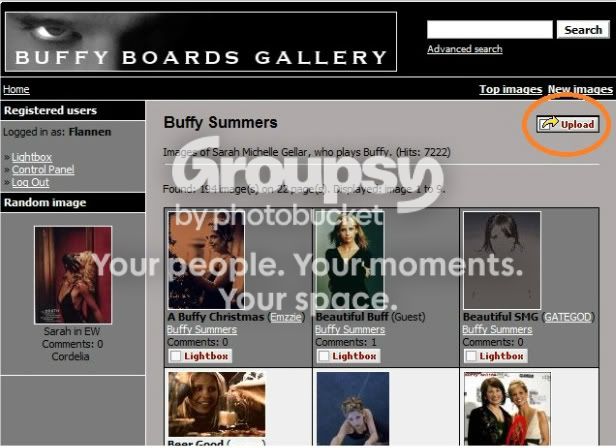
[MENTION=10498]Willow My Love[/MENTION] There should be an upload button. towards upper right hand corner of the page.
 
You need to click the category you would like to upload images to and then you will see a button to upload:

bbgallery-1.jpg


🙂
 
This page, right? https://www.buffy-boards.com/gallery/index.php?

I don't see where to upload.

You have to click on the category names of the images you want to upload... For instance, when you click on the Buffy Season 9 category, you will see this:
http://img.photobucket.com/albums/v204/BrittD379/buffy/bbupload.png

*EDIT*
LOL!! [MENTION=8858]Flannen[/MENTION], you and I were apparently doing the same thing at the same time. 😉
 
Last edited by a moderator:
Flannen
Flannen
LMAO. Ditto!
I'm always logged in on the main page on this computer. Nothing happens. It's the same as if I were trying to click on the banner in my signature. Nothing happens.
 
I'm always logged in on the main page on this computer. Nothing happens. It's the same as if I were trying to click on the banner in my signature. Nothing happens.

I use chrome as well. The upload button works for me but nothing on your banner. You've linked it so it should take you/me somewhere? Or you just made an example?
 
Oh, no, I was using it as an example, I'm sorry! It's not linked. That's what happens when I click the link to upload. Nothing. It's just like clicking a picture.
 
Washburne
Washburne
No need to be sorry. Just wanted clarification. I'm good at misunderstanding things.
How do I upload a custom avatar?

It says you can, but I don't see any way to upload images......
 
How do I upload a custom avatar?

It says you can, but I don't see any way to upload images......

As it says in the FAQ custom avatars are only for members of the staff. 🙂

There are tons of avatars to choose from and, as you'll see in the FAQ, if you'd like to see others, the best thing to do is upload them to the gallery to be considered the next time avatars are being 'made'.
 
BuffyElevated
BuffyElevated
[No message]
Back
Top Bottom