Kean gets her Gimp on...(this won't be pretty;))

Kean

Professional Bangel
Joined
Nov 13, 2007
Messages
11,945
Location
Ireland
Sineya
Well like the big sheep that I am I saw everyone else getting down with the gimpology and decided I had to get me some art!

So here it is Kean's "Art"...be gentle🙂
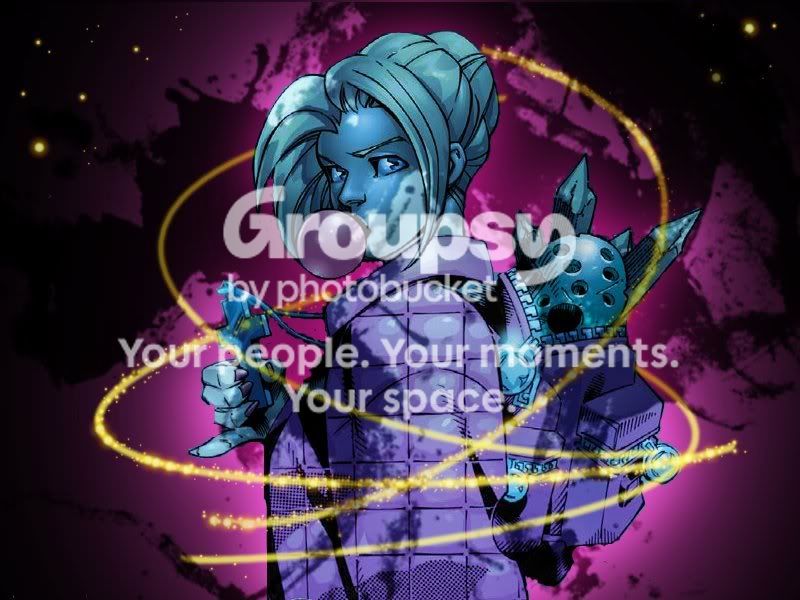
BuffytheVampireSlayer.jpg

Buffy the Vampire Slayer


This literally took me hours to do...even with a tutorial! The water colour is too dark on her face and it's a bit messy but for my first go I think it came out alright.
 
S
Senior Watcher
thats a 10/10 if i ever saw one!
Tranquillity
Tranquillity
That is SO good! - my first effort was awful!
white avenger
white avenger
But you left that other vampire out. Surely you couldn't have Buffy without Captain Forehead. Oh, wait, there's a stake in her pack. Do you think maybe she...? Nah...
I've never used gimp, so I have no idea how you did that little swirly thing...but I love it!! It's so cool! lol

Her face is a tad dark, and I would have been inclined to use some sort of lighting technique on the cross and the gum, but for a first attempt I think you did so amazingly well! I mean, seriously, you should have seen my first attempts, lol, they were embarrasing!

I cannot wait to see more from you, sweetie.
 
Kean
Kean
Thanks darlin:)
Everyone´s too modest. "Oh, buhu I´m so bad!" So maybe not all of you are the greatest there are, YET. But I don´t think I´ve seen anybody who I think has been worthy of bad reviews. I do see the point of getting advice though. Things can always get better. But you don´t need to be so humble. You´re all good.

Kean (see it´s not the right time 😉) , for a first time I think it´s absolutely great. But don´t take my word for it. I don´t even know what GIMP is...


edit: Sorry, didn´t see that you wrote under the picture. Nice too see someone who didn´t think all they do are pretty awful.
 
Kean
Kean
Belive me if I though it was truly awful it wouldn't be up there!
I've never used gimp, so I have no idea how you did that little swirly thing...but I love it!! It's so cool! lol

Her face is a tad dark, and I would have been inclined to use some sort of lighting technique on the cross and the gum, but for a first attempt I think you did so amazingly well! I mean, seriously, you should have seen my first attempts, lol, they were embarrasing!

I cannot wait to see more from you, sweetie.

Thanks hun🙂

I just used paths on the swirly things and then edit strokes. I had to do it a couple of different ways to get it.

I tried to fix her face and the shine on the cross but I kept messing it up so eventually I just gave up.LOL!
 
Nice first attempt!

And kudos on using the paths tool! I have not yet mastered that one. I mostly try to avoid it. lol.

To lighten trouble spots, you may want to try the dodge tool. Sometimes that helps.
 
Kean
Kean
Thanks hun...um..which tool is the dodge one? lol
This is a very cool first attempt. I realize the phrase 'first attempt' has slightly negative connotations, but don't take it that way! Haha. This is really nicely done, it's rough around the edges so-to-speak but it definitely shows promise, I like a lot of things about it- it all really works well together, but like you said it might be a little too dark in some areas.

And I'm not wrong in saying the picture is from the cover of the Halloween comic right?😉

But this is very nice- I do love the background and swirly thing. I'm definitely looking forward to seeing more.
 
Kean
Kean
It said comic two on the screen...so if that was the halloween cover then yes it is:D...thanks hun!
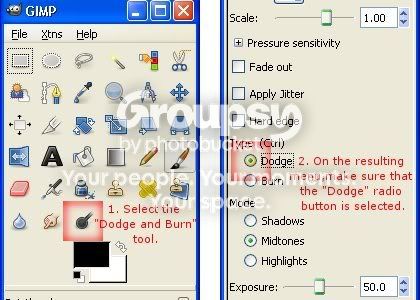
Here is where to find (and how to use) the dodge tool.

1. From the main GIMP toolbox, select the "Dodge and Burn" tool.
The Dodge and Burn menu appears below.

2. From the resulting Dodge and Burn menu, select the Dodge radio button.

Keaninstructions.jpg


3. Select a brush and adjust other parameters as necessary.

4. With the Dodge option still selected, use the Dodge tool to "paint" over the image just as you would use the paintbrush tool.


Hope this helps!
 
Kean
Kean
Much appreciated! I'll see if I can fix it with that:D
Nice work, especially for a first attempt 🙂 My first photoshop'd fan art was comics as well actually, comic Buffy and Angel 😛
 
Kean
Kean
Thanks hun...hope you enjoyed the soccer:)
Thats really awesome, I really like it! You'd never tell it ws your first piece!
 
Kean
Kean
Haha I don't know about that...thanks hun:)
:jawdrop: x5.

Holy crap, Kean. That's pretty fantastic! It's way more interesting and cooler than my first GIMP piece. LOL the student's already surpassed the teacher...guess when we have GIMP lessons it will be YOU teaching ME. (Because you know I'm a pretty awful teacher. LOMA!)

Anyway, I tried to do the swirly things on a piece of my own but it didn't work and I gave up lol!

Still :jawdrop:
 
Kean
Kean
We'll do the messenger thing tomorrow and we'll have you doing swirly things in no time:)
Looks great hon! I hate working with comic pictures - I leave that to my other half, but considering you say that's a first attempt you did a really great job on it, especially using the path tool to add the swirls - which look fab btw too! 🙂 Can't wait to see what you make next. 😀
 
Kean
Kean
Thanks Sar:)
thats really great Kean! well done. have you done any more recently since i know this thread is really old lol.....
 
Back
Top Bottom