Photoshop advanced help!

Skanky Vamp

Sniffin' the Slayer
Joined
Aug 12, 2008
Messages
26,460
Black Thorn
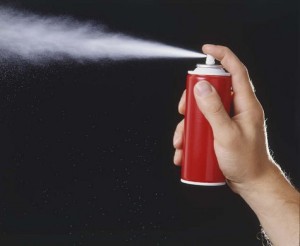
I am really stuck.. what I need to do is take an aerosol can image like this
spray-can.jpg

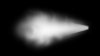
and make it spray like this
Aerosol1-300x246.jpg


does anyone know any special tricks to make this happen? I cant really do a photoshoot as my studio was taken away from me.. I am really at a loss.
 
Smoke doesn't really have the same density, or the... 'solidness' and speed of travel.. it looks wrong. I dont think it can be done.
 
This kind of effect can be tricky to pull off without a pressure sensitive tablet I'm afraid.

You can try different combinations of brush layers and warping effects but I don't think you'll be able to get the kind of realism you're looking for without a tablet.
 
Skanky Vamp
Skanky Vamp
Tricky is understatement. LOL.. I was told I didnt 'need' a tablet. Sigh.
The only thing I can think of is taking a photo of your can, and a photo of the kind of spray effect that you want, and place them together. I think if you put the spray on top of the photo that the can is in, and put it on Overlay (not sure if this is the exact filter, but you can experiment and see). It should come out with just the spray showing up on the can picture, not the photo around the spray; if it's not exactly how you want it, then you could use the clone tool. Another idea that could work is making a brush out of the spray. I don't know how to make brushes, but if you do, I could see that working fairly well.
 
Skanky Vamp
Skanky Vamp
the problem with that is that most of the images are on a black or grey background and i need it to be blue. Additionally, the background bleeds through the spray so it has a dark hue and not white when put on a different color background.
I admit, you made me curious. I did the following:

1)made a black background and then a white square on a new layer

2) edit-transform-distort - I turned the square into a trapeze that lies on its side

3) I selected the areas that needed to look like smoke with a wide feather (20-40 px) and then applied filters

-- blur-motion blur (several times with different angles)

-- distort-twirl (many times on different areas, always selected with a wide feather).

Here's the result. Not very realistic, but the longer you work on it the better it becomes.
 

Attachments

  • spray.jpg
    spray.jpg
    43 KB · Views: 9
I was thinking maybe take the picture of the spray that you want to add to the main picture, make it bluer by placing another fill layer and set it so that it looks like the background has become blue, and play with the coloring until it matches your need. Then
copy that picture and place it on the main can picture as a new layer, use the eraser tool (set to soft) to lose the parts you don't want.

Something like that. Don't know if that works, but that's just an idea 🙂
 
-- distort-twirl (many times on different areas, always selected with a wide feather).

Damn you!! I bet that's it.. I did everything else except the twirl. I bet that will give the look I was looking for.. right on. I will give it a go tomorrow and see how it works.
 
Back
Top Bottom