Windows Movie Maker = Evil

anyatara

Scooby
Joined
Mar 29, 2007
Messages
2,811
Age
31
I sorted out all the other problems with my computer, so I thought, oh, it's fine. But then I spent three and a half hours making a video, and now I can't save it. Everytime I try to, this comes up;

2vazjp0.png


I have loads of free space on the PC and all the source files are still there, so I don't know what the hecky is going on, but I really want to save that video, so can anyone help?
 
Yeah, I turned it off after. How do I install the new version? Ohh, I'm so confused, nothing will work 🙁
 
First you can check which version you have. Go to Help >> About Windows Movie Maker and there it will say something like Windows Movie Maker Version XXX (whatever version you have). If you don't have a version that starts with 2.1, go HERE, and the very kind (euhm...) people at Microsoft will help you out. You have to enter that page with IE, because I tried with Firefox and it told me I have to use IE! :S

Oh and you can check this out too Windows Movie Maker 2.1 FAQ
 
Mr. Pointy
Mr. Pointy
Please take five house points for helpfulness :)
I had the same problem with my video. I don't know what exactly you did, but after a while I fugured out I deleted some of the images I used for the video, that's why I couldn't save it. My solution was I used screen capturer while I played the video, saved this, later inserted it into moviemaker and put the song back on. Hope that helps
 
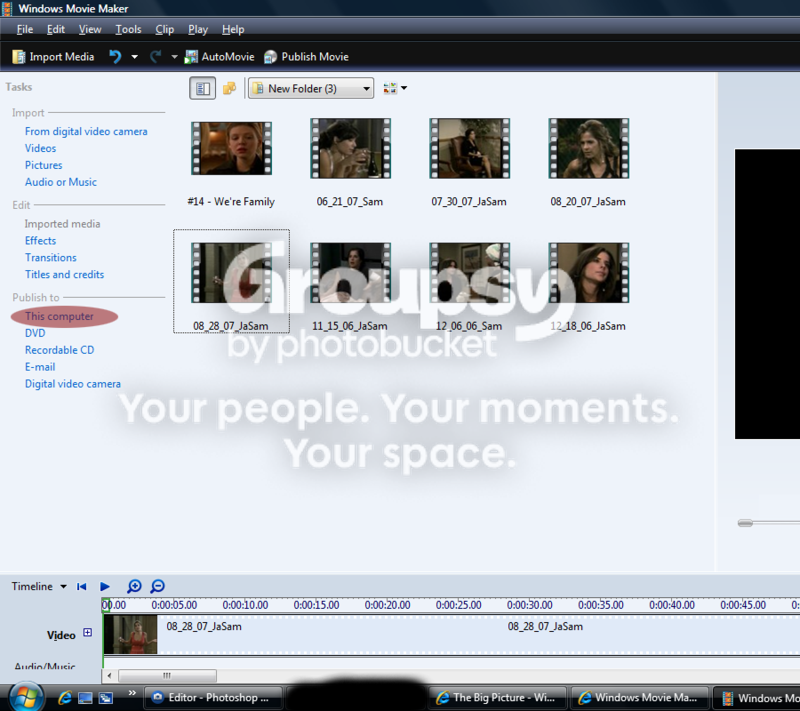
I know the feeling...WMM never would be good for me. It would always "encounter a problem" and needed to close. Did you click "Publish to this computer"?

wmmtutorial1.png


Did you also try saving it as a wmm file using Save As?
 
Yeah, I tried both of those things.

it's still not working, I don't know what's wrong with it.
 
Back
Top Bottom